Your bridge, now in your pocket.
We're launching the new Trader Dashboard: control all your bridge activity (signals, Prop Firm Shield, filters and stats), from your phone, live. No more remote-desktopping into your computer. The web app installs like a native app, compatible with Android and Apple.
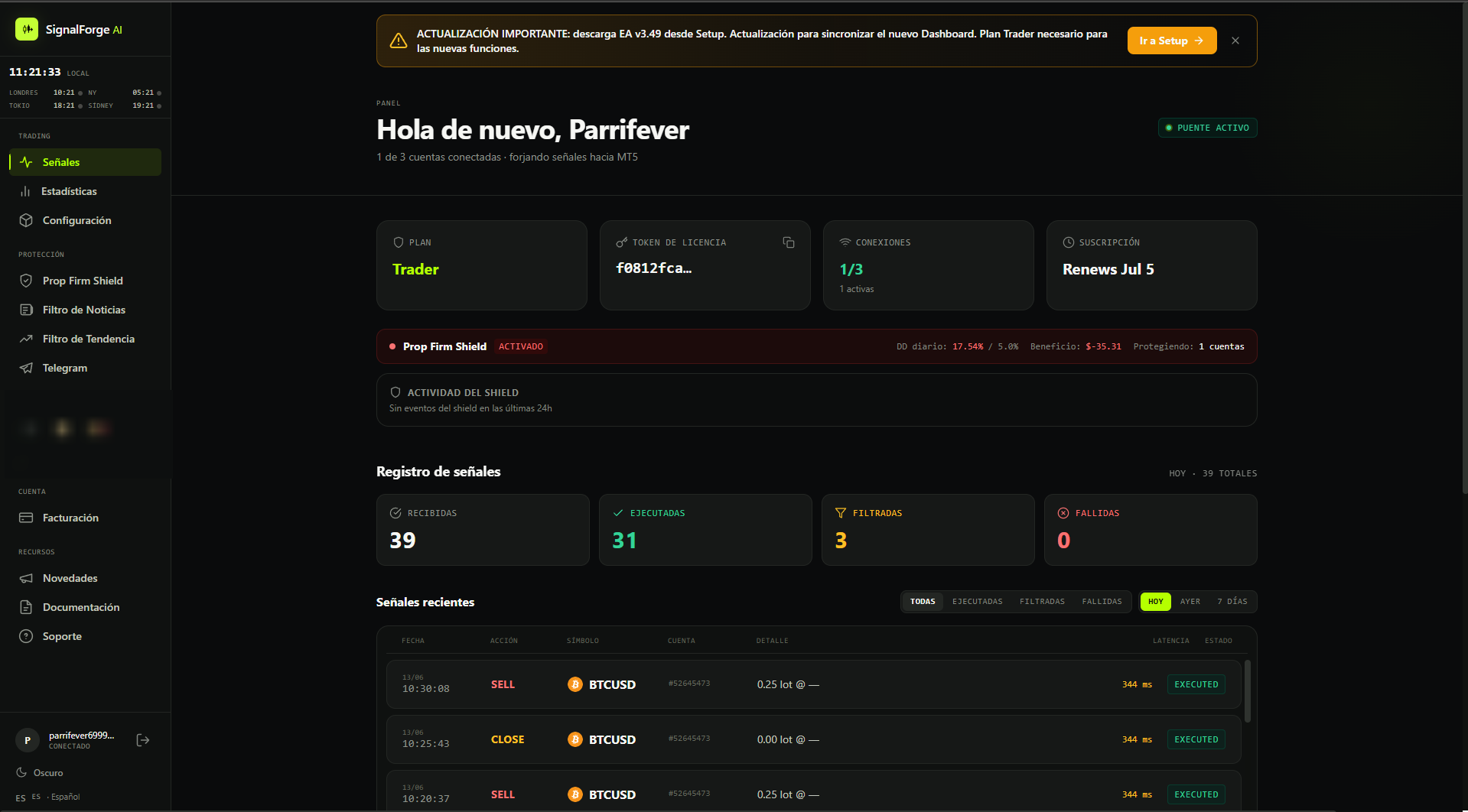
The new panel · plan, token, connections, Prop Firm Shield and signals in one live view.
What changes today.
The Dashboard goes from a signal viewer to a full control center for your bridge, reachable from any device. Same token, same accounts. Nothing to reconfigure. Just update the EA and open the web.
- Remote into the PC running MT5
- Only from the computer left on
- No real control away from home
- Limited view of the activity
- Open dashboard.signalforge-ai.com and you're in
- Full control from Android or Apple
- Prop Firm Shield, filters & Telegram at a tap
- Live stats and signals
- 14-day free trial · no card
To sync your bridge with the new Dashboard, download EA v3.49 from Setup and replace it in MT5. The new features require the Trader plan: try it free for 14 days, no card.
No more remote desktop.
Until now, to know what your EA was doing you had to leave the computer on with MT5 and remote-desktop in every time you wanted a look. Slow, tied to one machine, and painful from your phone.
The new Dashboard lives in the cloud. Your EA forges signals to MT5 like always, but now it reports everything to a panel you open from wherever you are:
- Bridge status live and connected accounts
- Every signal received, executed, filtered or failed
- Latency, P/L and Shield activity instantly
- No VPN, no remote, no PC glued to the screen
A web that feels like an app.
The Dashboard is an installable web app (PWA). From your phone's browser you add it to the home screen and it behaves like any app: its own icon, full screen, no browser bars. Compatible with Android and Apple.
- Android (Chrome): ⋮ menu → Add to Home screen → Install.
- iPhone / iPad (Safari): Share button → Add to Home Screen.
- Opens full screen, like any native app.
- Always up to date, no app store needed.
Your session is saved: next time you tap the icon and you're straight in.
Everything you control.
The panel isn't read-only. From your phone you tune protection, filters and alerts, and the changes apply to your account instantly.
Prop Firm Shield
Daily loss limit, profit target and what the EA does when the limit breaks. Daily reset countdown and live P/L.
News Filter
Pause trading around high-impact events (NFP, CPI, FOMC). Set minutes before and after, impact level and currencies to watch.
Trend Filter
Confirm every entry against your higher-timeframe bias, with up to three layers per symbol. Only fires when everything agrees.
Telegram
Trade alerts, P/L and Shield warnings to your chat or channel. Private mode or signal mode with pips and R:R ratio.
Live stats
Win rate, profit factor, cumulative P/L, calendar, performance by symbol and by hour of day, and the full trade history.
Signal log
Received, executed, filtered and failed: with symbol, lot, account, latency and status for every signal hitting the bridge.
Your shield, in the palm of your hand.
Prop Firm Shield is now fully configured from the panel. Set the daily loss limit, the mode (fixed amount or percentage of balance) and what happens when the limit breaks: lock, close open trades, or alert only.
- Next daily reset countdown per account
- Today's loss and max limit, live
- Optional profit target with its own action
- Independent setup for each connected account
Don't let one headline blow up your day.
The News Filter pauses trading around high-impact economic events, so the EA doesn't open entries right when the market goes wild. It's all set per account from the panel.
- Stop before and resume after: set the minutes before and after each event (30 and 30 by default).
- Impact level: "High only" (NFP, CPI, FOMC, central-bank decisions) or "High + Medium" (retail sales, PMI…).
- Close opposing positions: when the news hits, close anything against the expected direction.
- Currencies to watch: all, auto by pair, or a custom list.
- Built-in events calendar: today, this week or next.
You only trade with the move.
The Trend Filter confirms every entry against your higher-timeframe bias before executing it. It watches up to 3 layers per symbol and a signal only passes if all active layers agree on direction.
- If one layer disagrees, the entry becomes a CLOSE, it never opens against the trend.
- Add
{{interval}}to your TradingView alert message. Example:SELL {{interval}} {{ticker}}. The server matches the signal's timeframe to the layer automatically. Or set direction manually by clicking a layer cell. - Watchlist per symbol with its live LONG / SHORT verdict.
- Decision counter: approved, blocked and ignored.
- Telegram alert every time the trend flips.
Every trade, in your pocket instantly.
Connect your Telegram bot and get trade alerts, P/L and Shield warnings in your chat or channel. The connection is validated with a test message before anything is saved.
- Bot token + Chat ID, with an option to link automatically.
- Private mode: includes your account number, for you.
- Signal mode: hides the account and adds pip distances, R:R ratio and your channel signature, for broadcasting.
- Independent routing (chat + events) per account.
Every trade, accounted for.
The Stats tab gathers your real performance in one view: win rate, P/L, profit factor and number of trades, sliced by today, yesterday, week or month.
- Calendar with daily P/L or win rate
- Performance by symbol and by hour of day
- Cumulative P/L curve
- Trade history with entry and exit price
Done in 3 steps.
If you already use SignalForge, your token and accounts stay the same. Just update the EA and open the web. The new features require the Trader plan.
Update to EA v3.49
Download the v3.49 Expert Advisor from the Setup section of your account and replace the old one in MT5. This version is what syncs the bridge with the new Dashboard.
Open the Dashboard
Go to dashboard.signalforge-ai.com from your phone or computer with the same account. You'll see your bridge, your accounts and your signals live, with nothing to reconfigure.
Install it as an app
On Android: browser menu → Add to Home screen. On iPhone/iPad: Share → Add to Home Screen. Now your bridge control is one tap away. Trader plan required for the new features.
Control your bridge from anywhere.
The new Dashboard turns your phone into the remote control for your automated trading. No remote desktop, no being tied to the PC. Update to EA v3.49, open the web and install it as an app. Included in the Trader plan, with a 14-day free trial, no card.
Quick questions.
Email soporte@signalforge-ai.com if yours isn't here.
In your pocket.
Your TradingView → MT5 bridge, controlled from your phone. Update, open, install.